
11 December 2010
IT problems today

6 December 2010
24/6 and Christmas vacation opening hours
Monday - Friday we are open 24 hours. The Help desk is open 09:00 - 18:00.
Saturday we close at 18:00. The Help desk is open 10:00 - 13:00.
Sunday we open at 11:00.
On Friday, 17 December 2010 the building will close at 22:00.
Christmas vacation opening hours
Saturday, 18 December 2010 - Saturday, 8 January 2011
(Please note for the vacation period we will close at 23:00 on Thursday, 23 December 2010 and re-open at 08:00 on Tuesday, 4 January 2011. Our book return boxes will also be closed during this time.)
Monday - Friday we are open 08:00 - 23:00. The Help desk is open 09:00 - 17:00.
Saturday we are open 11:00 - 18:00. The Help desk is not available.
Sunday we are open 11:00 - 18:00. The Help desk is not available.
On Monday, 20 December 2010 the Help desk will close at 12:00. We apologise for any inconvenience caused.
2 December 2010
Access to Westlaw & Lexis off campus
To access off campus please use the proxy server - see instructions
http//www1.aston.ac.uk/lis/eis/
You can also phone Westlaw ( 0800 028 2200 ) and ask them to do a search for you and they will e-mail the results to you. They are aware there is a problem with Shibboleth access. Dont forget to use Lexis and Lawtel as alternative resources.
NB- use the law section of the Aston e Library - there are lots of alternative free resources for legal research.
Adele Champken - Information Specialist (Law)
**3rd Dec. This problem has now been fixed, and you can log on to Westlaw and Lexis as usual via the e-Library. Apologies for the inconvenience**
30 November 2010
Relax, have a coffee and read the latest news
The newspaper stand has now moved from the 3rd floor to the Library Ground Floor. You will find the newspapers located next to Cafe Libro. Please feel free to visit the Library, grab a coffee and read the latest news. When you have finished - just pop the newspaper back on the stand. The newspaper stand contains the last 3 months of The Financial Times, The Guardian, The Independent and The Times. We will update the stand on a daily basis.
We also have online access to a wide range of global news publications via the database called Nexis UK. Please visit the Aston e-Library > access the Find Resource tab > choose Locate and type in Nexis UK. To access this service off campus you will need to type in your network username and password.
26 November 2010
Safari Tech Books Online availability via Library Catalogue
**These e-books have now been restored on the library catalogue. Sorry for any inconvenience** 30/11/10
17 November 2010
Access to the FT.com now discontinued
Aston University Library would like to alert students to the fact that Aston University Library is no longer providing automatic access to FT.com web site. The subscription costs to the FT.com were doubled and we were unable to proceed with a renewal to this service. The link to the FT.com is now no longer available through the Aston e-Library.
How do I access The Financial Times now?
However, the Library still provides access to the Financial Times through our newspaper databases NEXIS UK and our journal database ABI INFORM. You can access the Financial Times specifically by following these instructions:
- Access the Aston e-Library from the Library homepage http://www.aston.ac.uk/lis
- Log in with your network username and password
- Click on FIND E-JOURNAL
- Type Financial Times in to the search box and click GO
- Click on the newspaper name in the results list
- Just click the red GO button next to the database you want to use
In Nexis UK the Financial Times appears as an individual title in the source box. You can now type your topic key words in to the search box and Nexis UK will search for those words within the Financial Times articles.
In ABI Inform you will see all the issues in date order which you can browse at leisure or you can search for specific articles on a topic by using the search box at the top of the screen.
You can also find the last month of the Financial Times newspaper on the newspaper stand on the ground floor of the Library Building- next to Cafe Libro
5 November 2010
New for November 2010 - Changes to login process for renewing and reserving books
To access your Library Record you should do the following:
Step 1: Go to http://library.aston.ac.uk and click on the My Library Record link on the right hand side.
Step 2: You will see the following screen. For Aston staff and students enter your computer username and password in the boxes and click submit. Only visitors should continue to use their barcode number and PIN
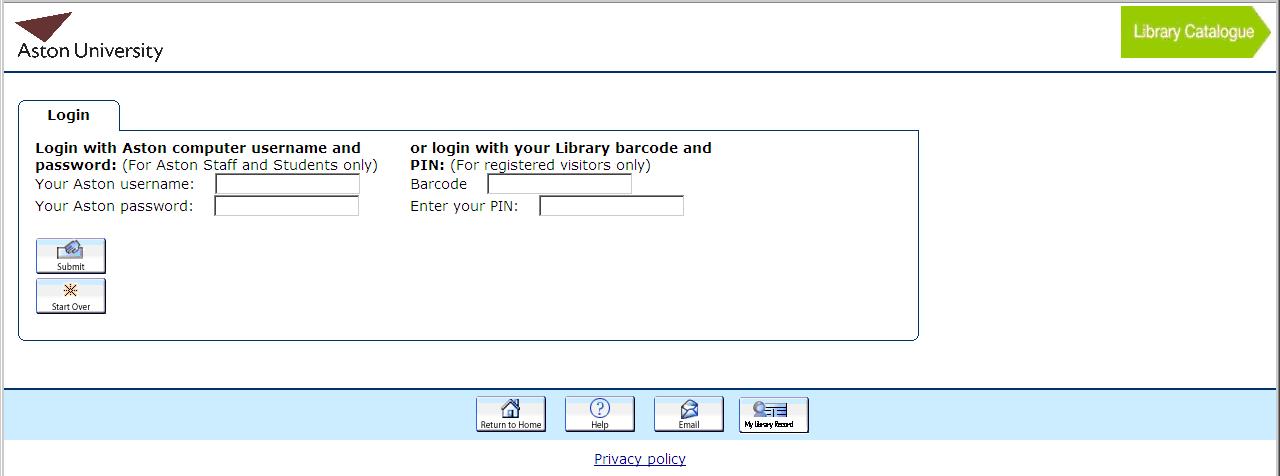
To reserve items you should do the following:
Step 1: Search for a book and bring up the main details. If all copies are on loan click on the reserve button at the top of the screen.
Step 2: You will see the following screen. For Aston staff and students enter your computer username and password in the boxes and click submit. Only visitors should continue to use their barcode number and PIN

Step 3: You will get a confirmation screen if the reservation is successful and an email will be sent to your Aston email account when the book is ready for you to collect.

 Posts
Posts

