Showing posts with label reservations. Show all posts

16 February 2015

Planned system maintenance - Saturday 21st February 2015

The Library system will be unavailable between 20:00 on 21st February and 02:00 on 22nd February due to planned maintenance.

During this time you will not be able to:
  • Log in to your Library Record
  • Renew any items on your Library Record
  • Search the catalogue and place reservations

  • You will still be able to:
  • Search Library SmartSearch
  • Access electronic resources
  • Use your LibGuides

  • The maintenance should be completed by the time the Library opens on Sunday 22nd February and all normal out of hours services should be available.  If you experience any problems please let us know by emailing library@aston.ac.uk

    19 August 2013

    27th August 2013 – Library System Unavailable

    The Library system will be unavailable on 27th August 2013 due to a scheduled maintenance upgrade.  It will not be possible to check book availability, reserve or renew books during this period. 

    It should still be possible to use Library SmartSearch to access databases, electronic journals and ebooks during this time. 

    We apologise for any inconvenience.

    26 March 2013

    Reminder about book loans over Easter vacation

    Books will continue to be loaned for the normal seven day, one day or long loan period during the Easter vacation.

    They will need to be renewed online: https://library.aston.ac.uk/patroninfo or returned when due.
    (No books will be due for return during the Library closed period between Friday, 29th March to Tuesday, 2nd April inclusive.)

    Any book which cannot be renewed due to a reservation will need to be returned by post if necessary.

    Fines will be charged for late return.

    Best wishes for the Easter break.

    18 March 2013

    Book loans over the Easter vacation

    Books will continue to be loaned for the normal seven day, one day or long loan period during the Easter vacation. They will need to be renewed online: https://library.aston.ac.uk/patroninfo or returned when due. (No books will be due for return during the library closed period between Friday, 29th March to Tuesday, 2nd April inclusive.) Any book which cannot be renewed due to a reservation will need to be returned by post if necessary. Fines will be charged for late return. Best wishes for the Easter break.

    31 March 2011

    Book loans over the Easter vacation

    Books will continue to be loaned for the normal seven day, one day or long loan period during the Easter vacation. They will need to be renewed online: https://library.aston.ac.uk/patroninfo or returned when due.

    (No books will be due for return during the library closed period Friday, 22nd April to Tuesday, 26th April inclusive or between Friday, 29th April to Monday, 2nd May inclusive.)

    Any book which cannot be renewed due to a reservation will need to be returned by post if necessary. Fines will be charged for late return.

    5 November 2010

    New for November 2010 - Changes to login process for renewing and reserving books

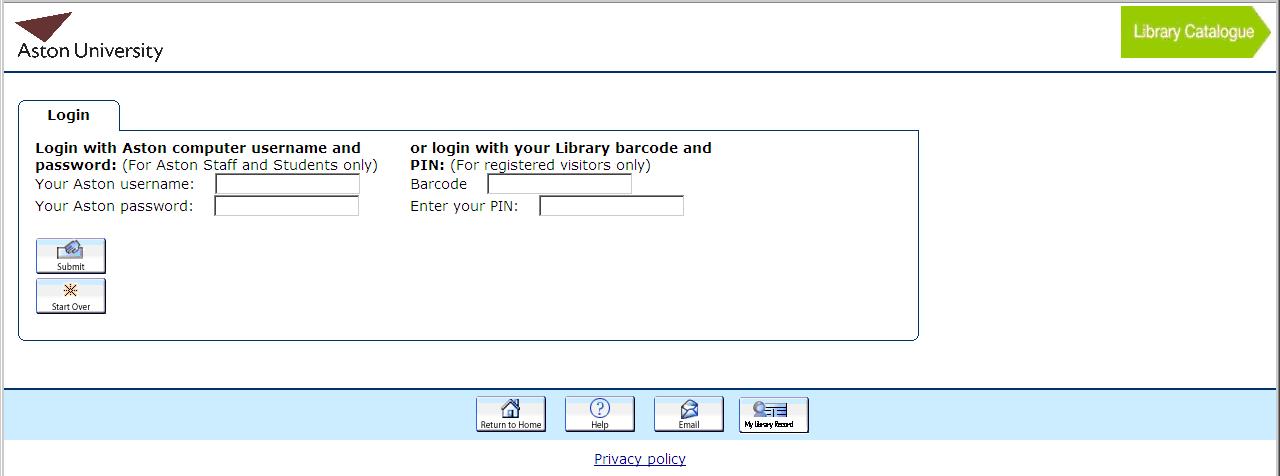
    From 2nd November 2010 you will no longer need to remember your Library barcode and PIN if you are an Aston student or staff member. Instead you can use your Aston computer login and password to access your Library Record or place reservations.

    To access your Library Record you should do the following:
    Step 1:
    Go to http://library.aston.ac.uk and click on the My Library Record link on the right hand side.

    Step 2: You will see the following screen. For Aston staff and students enter your computer username and password in the boxes and click submit. Only visitors should continue to use their barcode number and PIN


    To reserve items you should do the following:
    Step 1: Search for a book and bring up the main details. If all copies are on loan click on the reserve button at the top of the screen.

    Step 2: You will see the following screen. For Aston staff and students enter your computer username and password in the boxes and click submit. Only visitors should continue to use their barcode number and PIN


    Step 3: You will get a confirmation screen if the reservation is successful and an email will be sent to your Aston email account when the book is ready for you to collect.